sty
1

How many smartphones do you think Nokia unveiled this year? I’ve been taking a look back at the last 12 months and I’m amazed at how busy they’ve been!
The year started with a bang – most people still had their Christmas decorations up when the Nokia Lumia 900 was unveiled in early January.

Click here to view the video on YouTube.
Such was the excitement around this device that there was even a concert in Times Square with Nicki Minaj to announce its arrival in the USA.
The Lumia 900’s reputation was also given a hammering (but in a good way) when a video emerged of someone trying to put some nails through its screen. Not just a great smartphone, but a tough one too.

Click here to view the video on YouTube.
Two other Lumia 900 highlights on Nokia Conversations was an interview with designer Stefan Pannenbecker and a look at how engineers gave the Lumia 900 its terrific audio performance.
How many megapixels!?
If it’s February then it must be the Mobile World Congress in Barcelona. In 2012, Nokia announced a couple of smartphones in the Spanish city.

Click here to view the video on YouTube.
The Nokia Lumia 610 gave teenagers on a budget the chance to get the full Windows Phone experience with social networking, music, Web browsing, gaming and apps.
However, the star of the show was undoubtedly the Nokia 808 PureView with its revolutionary imaging technology and headline-grabbing 41-megapixel sensor.
This amazing device picked up awards throughout the year and critics were quick to herald a new camera phone revolution.

Click here to view the video on YouTube.
It was so good that many people (not just me) were comparing it favourably with compact digital cameras and one man even set up a website devoted to it.
It wouldn’t be the last time we heard about PureView technology in 2012.
A new generation
Another highlight of the year was the unveiling in early September of Nokia’s first Windows Phone 8 devices in New York.
The Nokia Lumia 920 came with a raft of technological innovations and its gorgeous industrial design quickly won a host of admirers.

Click here to view the video on YouTube.
As well as wireless charging, the Lumia 920 introduced everyone to PureMotion HD+, which meant it had the fastest and most sensitive smartphone touchscreen coupled with good sunlight readability.
Not to mention, of course, the latest evolution of PureView technology with its low-light capability and optical image stabilisation.
The Nokia Lumia 820 also featured wireless charging, with the help of its exchangeable wireless charging shells, and in my humble opinion was the best looking phone of 2012.

Click here to view the video on YouTube.
A lot of the credit for that must go to Nicola Ralston and her team at Nokia’s Colour and Material Design Team. She told Conversations about their design approach to these stunning smartphones.
The following months saw several variants of the Lumia 820 launching in the USA, such as the Lumia 810 and Lumia 822. They were all similar and yet somehow different, but still, essentially, fantastic smartphones.
Lumia for the masses
The end of October saw the launch of Nokia’s most affordable Lumia yet – the Lumia 510.

This entry-level smartphone still packed in plenty of features despite its great low price. It sported a 4-inch display, 5-megapixel autofocus camera and came in five eye-catching colours: red, yellow, cyan, white and black.
This was quickly followed by the Nokia Lumia 620, which like the Lumia 920 and Lumia 820, was powered by Windows Phone 8.
The Lumia 620 also has exchangeable shells, and is made with a ‘Dual Shot’ technique, which gives its body a unique depth and translucency to its colour – of which there is a variety to choose from.

Click here to view the video on YouTube.
It is already becoming apparent that the Lumia 620 will be appealing to a wide spectrum of people – from teenagers all the way to business professionals.
By my count, that’s over half a dozen smartphones in the space of a year. I’m hoping that 2013 will be just as busy!

Tags: None
sty
1

If there’s one industry that mirrors mobile tech when it comes to ingenuity it’s the movie business. Just look at The Hobbit now blazing a trail in cinemas around the world. It’s the first film to make use of the TS-5, a two-camera system that behaves like a single camera for better 3D. While this revolutionary tech is stunning to the eyes, The Hobbit is far from the first blockbuster to dramatically change the way movies are made.
Star Wars (1977)
Heard of an animated 3D wireframe graphic? You would have seen it for the first time during the trench run briefing scene in the first Star Wars film. It had been formulated by Larry Cuba working at the Circle Graphics Habitat – later the Electronic Visualization Laboratory (EVL) – at Illinois University. Ridley Scott would later use the same technology in Alien, when the ship flies over the alien planet. Star Wars was also the first to use Dolby Stereo – so the Force really was with you.
Tron (1982)
OK it wasn’t technically a blockbuster at the time but it was the first extensive use of 3D. The 3D cycle race was a neon wonder. Triple-III, who had pioneered CG in Westworld, were also on board. Pre-internet – computer animation was outsourced to a number of different companies. Polaroids of progress were posted to director Steve Lisberger, who admitted that ‘…the biggest computer we had on the whole movie was 256K……you have more computing power on your cell phone than we had on the whole first movie.’ Still looked fab though!
Jurassic Park (1993)
It’s hard to imagine that first reveal – dinosaurs that looked as if they might step out from the screen. It was a brave advance demanded by director Steven Spielberg – the first physically textured CGI. Film crew also used stop-motion miniatures and animatronics. The whole enterprise would succeed or fail on the power of digital characters – another first. In an astonishing twist, Ray Harryhausen, the genius of stop-frame animation, was visiting the studios at the time. He was shown some footage of the dinosaurs and exclaimed ‘Now there’s the future!’
Toy Story (1995)
Only 27 animators worked on this Disney/Pixar production, the first full 3D animation. Disney had been an innovator, but computer-generated animation fast replaced the traditional hand-inked method. Experiments in 3D – in Beauty and the Beast’s ballroom scene and the Wildebeest stampede in The Lion King – excited a whole industry. A palette of thousands of colours could be used. Toy Story’s technical director Bill Reeves proudly said ‘We were essentially kick-starting an industry in terms of CG films.’ Jeffrey Katzenberg, CEO of Dreamworks (later, Dreamworks Animation) would later say that ‘more is never enough.’
The Matrix (1999)
Call it time-slice or bullet-time – there are a number of other special effect names – it was used first in the super cool The Matrix. Green screen technology, lasers and high-speed full-motion cameras – where the action slows down or freezes as the camera seems to circle 360 degrees around the characters. Actors are placed on wires, with wires erased in post-production. It wasn’t completely about the special effects –actors still had to do over a year of martial arts training, as well as having a zen-like reading list.
Of course films are now astonishingly tech-savvy and keep making amazing advances – but will we ever again have that child-like ‘wow’ feeling that these films gave us at the time? Let us know your thoughts in the comments below.
Image credit: KathrynMcGrane

Tags: None
gru
30
Yes i know to most of you out there this information about the iPad using a MicroSIM is not new to you, but for most of you in the Middle-East hungry for an iPad in your hands; HOLD YOUR HORSES!!! Let me first say that 100% of all GSM operators in the world use the default SIM size. Now good old Steve has given a nudge to the telecom operators around the world.
Apple’s big reveal of 2010 was the glorious iPad, some have given their critical analysis of the device. I say the device will pick up like any Apple device in the market. Now the jolt that the mobile industry got was that the iPad uses a MicroSIM enable it to use 3G. Apple’s tie or (love/hate) relationship with AT&T gave it a heads up on orders of MicroSIMS to deliver its service to its customers in the US.
So what is the (MicroSIM) : The 3FF SIM card, or the micro SIM, is 52% smaller than a regular SIM card so instead of a 15 x 25mm card you get a 12 x 15mm one. It’s still a GSM SIM so it will work in most markets. Now I believe Apple’s attempt to lock the SIM during the iPhone launch days blew up in their face.
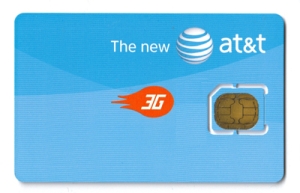
Last, This MicroSIM isn’t an industry stopper is it. Well no, most operators are going to offer a this MicroSIM as a bundle package with the iPad. I say why bother, request a twin SIM from your local operator, shave the new SIM with plastic or acrylic filer and your good to go. Haven’t tested it myself, I will surely let you know if it works as soon as my iPad lands.


Tags: None
gru
30

The sense of freedom, the sense of mobility, the outstanding feeling of knowing you left nothing behind. The Nokia Booklet 3G, where do I start? , but first let me make a statement. The Nokia Booklet 3G is a ‘Netbook’ and not a laptop so treat it as such.
Design, Size, Weight, Screen are flawless. I couldn’t say anything else, because I was surely impressed on how much Nokia put thought into this device. Speed for me is just fine; some have complained about its RAM and processor, frankly I would tell them they have no idea about computer mechanics. There is something they haven’t noticed and people like me would pay top dollars for. That is the NO FAN option, finally can sit in bed and not disturb anyone with the whizzing sound of the cooling fan. Plus what more can you ask from a netbook, use it as it was design and supposed to be used so just plug in a 2GB Flash drive and use it as a ReadyBoost or have you totally forgot about that?. Coming back to the essential elements of this device, using the 3G gave me the ability to sit where and when ever I want. No Dongles, Bluetooth, or Cable connections required. Power on and connect, simply amazing feeling you’ve got knowing you can get what you want in no time. The Nokia Booklet 3G is such a good device that I know use it as my own corporate computer device. Called in IT and asked them to remove my bulky laptop back it up on the local network so I could access it on my booklet. My desk is so clean right now it’s not even funny. I put this device to the ultimate test on the first day of work, dropped my notebook pens and every manual item you can possibly take to a meeting. Fired up OneNote, held a 3 hour meeting took all the notes I needed on my Booklet, attached pictures from my N900 and I was the first one out of the door. Didn’t have to gather all my papers, put together my laptop disconnect my charger, and wind up all sorts of wires. The best part I even leave quicker, All I’ve got is my Booklet and I’m out, charger is at home.
Last but not least, and I know most of you want to hear some partially negative things about this device and I don’t blame you. Nothing is perfect, and yes for some the Nokia Booklet is not the perfect device. But I can highlight some things that can be on the list of improvements for the RX-80 probably. First I would love a touch screen integration, which would make things a lot faster for me. The keyboard keys to be backlit, would make a big difference in low light environments. The ‘Ctrl’ key to be on the very left instead of the ‘fn’ key. More Nokia related software built-in, to control the connectivity. Would love a remote viewer built-in so I could make calls with my device but talk and hear it through my booklet or my BH-504 connected to my booklet. Why bother all your customers with the SIM lock by AT&T, It’s very easy to crack save us the hassle and include a Nokia UI for the SIM connectivity.
Final review thought, if you’re looking for being connected ‘Full Internet As It Happens’ the Nokia Booklet 3G is the device for you. If you’re a laptop speed oriented and has 16 million applications and programs the Nokia Booklet 3G won’t do for you. If you’re a on the move business person, looking for agility and essential connectivity, the Nokia Booklet 3G serves every single part of that.

Nokia Booklet 3G


Tags: None
gru
29
Play wraz z Agencją Grandes Kochonos przygotował noworoczną kampanię promującą najpopularniejszy smartfon w ofercie PLAY. 15-sekundowy spot pokazuje zalety Samsunga Galaxy S Advance – duży, ergonomicznie wygięty wyświetlacz oraz wysokiej jakości wykończenie. Wyświetlacz Super AMOLED gwarantuje doskonale żywy obraz dzięki czemu zdjęcia nabierają wyrazistych barw. Samsung Galaxy S Advance jest dostępny w Noworocznej FORMULE za [...]
Tags: None
gru
29
Play wraz z Agencją Grandes Kochonos przygotował noworoczną kampanię promującą najpopularniejszy smartfon w ofercie PLAY. 15-sekundowy spot pokazuje zalety Samsunga Galaxy S Advance – duży, ergonomicznie wygięty wyświetlacz oraz wysokiej jakości wykończenie. Wyświetlacz Super AMOLED gwarantuje doskonale żywy obraz dzięki czemu zdjęcia nabierają wyrazistych barw. Samsung Galaxy S Advance jest dostępny w Noworocznej FORMULE za [...]
Tags: None
gru
29

If you have found a beautiful Nokia Lumia with Windows Phone 8 under the Christmas tree, you might wonder how to make the most out of it. We created a handy overview to guide you through all the features currently available for Nokia Maps, Nokia Drive, Nokia Transport and Nokia City Lens and to answer all the frequently asked questions.
What are these apps all about?
 Nokia Maps has been designed to help you find places anywhere, get reviews, photos (you can contribute too) and then plan a route to get there.
Nokia Drive is for all of you who frequently use a car, to commute or travel. It has a unique user interface developed for in-car and arm-length use. The last update includes battery life improvements.
Nokia Transport is for commuters on buses and trains who want to know the best time to leave the office or partygoers who want a one-tap access to the next bus home.
Last but not least, Nokia City Lens is the next step in augmented reality apps: it helps you find the best places around you through the camera viewfinder.
Why separate apps?
Some of you are wondering why we are developing separate location based apps. In our user tests we realized that people want an easy and fast way to solve their every day needs like walking, driving or riding the bus. With our apps and the power of Windows Phone you can for instance easily pin to start the destinations you go to more often or the apps that really matter to you. Also, we can develop much faster new features if we keep some apps separate.

Nokia Lumia 920 and Lumia 820
Our first Windows Phone 8 smartphones.
Be a part of it.
How to switch from app to app?
Even if most of the time you will use our apps to “drive home” (Nokia Drive) or “ride the bus to work” (Nokia Transport) or “find nearby restaurants” (Nokia City Lens), there are also cases when you start using one app but you need another one to support.
For instance, if you are looking for a vintage shoe shop, you open Nokia Maps to find it, you calculate the route to get there but it’s a bit far away to go on foot. No problems, Nokia Maps can also tell you how to get there by car or public transport and lets you seamlessly start either Nokia Drive or Nokia Transport to get voice-guided car navigation or bus and trains schedules. Easy.


Where is traffic information?
While we are still polishing Nokia Drive to introduce My Commute also on Windows Phone 8, you can see traffic alerts and incidents on Nokia Maps by activating the corresponding map style. In the latest Nokia Maps release we have also particularly improved the display of such information, make sure you have the latest version! (v 3.1).


How do I get spoken street names?
When you first start Nokia Drive, you will be asked to download street maps for offline use and also voice guidance. You can select among over 50 languages, sometimes also different regionalisms or male/female voices. For a crystal clear voice-guided navigation, we have asked professionals to record their voices for you. If you prefer to hear “in 300m turn left into Oxford Street”, you can also select a voice with spoken street names. Make sure you select this option if this feature is very important to you – in this case a computer voice will guide you during your journey.


Where is Nokia Transport available?
Nokia Transport is available for 550+ cities in 50+ countries around the world. In 105 cities you can also get timetable information either according to the available schedule or to real time situation. We are closely working with different transport agencies to collect accurate information, the quality of which exceeds the standard provided by other solutions.
Additionally, we are continuously extending our coverage: just recently we added many cities in Russia.


Where are street maps available?
We have maps data for nearly 200 countries and navigation for around 100 countries. Of course we continue expanding our coverage, in fact, Serbia and Israel, which many of you were waiting for, are now in our database too. To benefit from coverage updates, make sure you are connected to Wi-Fi then go to settings > applications > maps > check for updates.
What can I pin to start?
One of the most interesting features of Windows Phone is the possibility to pin apps and features to the start screen, creating a truly personal experience. Our location-based apps are no exception and let you pin to start places, categories, routes and destinations for one-tap access to what you need.
Which of these apps do you use the most? Let us know in the comments section below or send a Tweet to @heremaps.

Tags: None
gru
29

The future is in your hands
By now you should have read what’s happened in the past and what’s happening right now in the world of Nokia Connects, but what does the future hold? Well, that’s really up to you guys. We’re putting the future of Nokia Connects in your hands (kind of). Tell us what you’d like to see, and we’ll try our Christmas socks off to make it happen.

Competitions
Having seen the way you guys embraced competitions like the Nokia Cardboard Challenge, the #NokiaLVK mood board contest and the current Nokia Paper Challenge it seems that the creative among you are on board with this type of contest. But what about those who are more thumbs than fingers? What would you like to see in the way of competitions next year? Photography assignments? A round the world SMS relay challenge? We’re open to (reasonable) suggestions!
Events
What would you like to see from a Nokia Connects event? Where would it be? Would I finally get to meet CJ (and so many more of you guys) face to face? If the timing, location, event plan, guest list (this means I am on it) are right, we could be headed your way! Let us know what kind of events we could get involved in, and we’ll talk. This past few years we’ve ridden horses in Calgary, rocked out to Deadmau5 in London (TWICE!), and of course met lots of new friends at Social Media Week events around the world. What’s next?

Trials
You guys are special. You do special things with special pieces of technology. Some of you go all out and amaze us every day with your pictures, your crazy ideas, and special places that you have taken the phones. We want more of this next year. Lots more. All ideas are welcome, the more out there the better (all in good taste and within reason, of course). Is there an event you’d enjoy so much more with the latest Nokia in your hands? Something you’ve always wanted to discover, but couldn’t previously, or a series of photographs that you have in mind? Leave your ideas when you fill out the Trial a Nokia form and let us know.
So that’s what the future holds for Nokia Connects, and as you can see it’s up to you to create some truly memorable contests, events and trials. We’re open to suggestions, so get thinking. Have a very Happy New Year, and see you in 2013!

Tags: None
gru
29

There’s little chance that you wouldn’t recognise one of Nokia Music’s greatest evangelists on a trip to Nokia House. Just look out for the man with the rockabilly hairstyle; not one, but two pairs of Purity by Monster headphones round his neck, and the strong likelihood of a JBL wireless-charging speaker in his hands.
Dean Pattrick’s Start screen says as much about his interests as his accessories do, of course. We’re loving the way you can tell so much about a person from their screen.

So Dean, tell us the apps you’ve prioritised and why?
Nokia Music: You can tell from the screen that MUSIC features heavily – Nokia Music client, dance mix & Green Day playlists offline cached to the devices, Taylor Swift that was an NFC playlist from a Music poster and finally the Swedish House Mafia gig that takes place on the 20th Dec.
This is not just for demo-ing but also using “living the dream” and listening to Nokia Music at every possible time, whether I am commuting, in-between meetings, ironing, the list goes on.
People Hub: The essential way to interact with your friends, family and the great people I work with.
Sports Tracker: The best way to track your sporting activities. Before you ask yes I do listen to music when I work out J
Accuweather: For checking when to go running and biking… I’m not too fond of cycling to work in the pouring rain…
Connectivity Shortcuts: I cannot live without the quick links to WiFi and Bluetooth
What apps do you use to pass the time?
Apart from Nokia Music it has to be NETFLIX. A superb app for watching films, tv programs, cartoons. Although a premium service (8€ per month) I can watch on the Lumia, PC, Xbox, PS3 and the TV.
What is the last app you paid for, and what does it do?
NFC Interactor although it is not on my main screen this is a great tool for programming NFC tags.
Which app(s) is your guilty pleasure?
Formula 1. If you like F1, then you cannot live without this app, it has everything in (almost) real time. Count down timer for the practice, qualifier and the race; track view; updated race results etc etc. It really is a one stop shop for F1.

Tags: None
gru
29

I love the whole process of taking something new out of the box and turning it on for the first time. It’s like a little bit of magic where you are bringing something to life.
Mobile devices are particularly rewarding because they need to be set up with your email addresses, contacts and social networks. Then they can be customised with apps and games to the nth degree.

However, you’re still not quite finished with it. You will also need some accessories. Even if you don’t need them, you will almost certainly want them.
Only a true gadget enthusiast will understand that it’s not just necessary to get your primary device but it’s also highly desirable to get all the paraphernalia that goes with it.
It’s not just buying for consumption’s sake either – the gear produced by Nokia often extends the functionality of your smartphone or mobile device.
Let’s look back at some of the standout accessories that have been produced by Nokia in 2012.
Rather than sticking to a rigid chronological format, I’ve divided this post into several categories. Let’s start with some goodies for the Nokia Lumia 920 and Lumia 820.
Look, no wires

Click here to view the video on YouTube.
Among the many great features on the Nokia Lumia 920 and Lumia 820 smartphones is the ability to charge up your device without the need for any wires.
The Lumia 920 is equipped to do this straight out of the box and there are several accessories for you to choose from.
My personal favourite is the Nokia Wireless Charging Pillow by Fatboy but you also have the Wireless Charging Plate and the Wireless Charging Stand to choose from.
The Lumia 820 requires the help of a wireless charging shell before you can use any of the accessories above. However, if wireless charging isn’t important to you then another option is a rugged shell that gives your Lumia 820 extra protection.

Click here to view the video on YouTube.
All about audio
As well as making phone calls, taking pictures and everything else, your Nokia smartphone is also pretty handy for playing music.
Nicely straddling the audio and wireless charging divide is the JBL PowerUp Wireless Charging Speaker. This audio colossus can wirelessly charge up your Lumia 920 or Lumia 820 while connecting by NFC or Bluetooth to play the music on your smartphone.
Another accessory born from the partnership between JBL and Nokia is the JBL PlayUp Portable Wireless Speaker. Again, it plays the music from your Lumia smartphone using either a Bluetooth or NFC connection. Older phones are not left out either; they can use the standard 3.5mm jack.

Click here to view the video on YouTube.
What is particularly wonderful about these accessories, and indeed most of the products featured here, is that they share a common design language and colour approach.
They are different shapes and sizes but still complement each other effortlessly.
On your head
You could definitely say that about the Nokia Purity Pro Wireless Stereo Headset by Monster.

These gorgeous and striking headphones connect wirelessly to your phone, feature active noise cancellation and when you’re done with them, they can be folded away for easy storage – the folding action also doubles up as a on/off switch to save battery life.
If you want to try something a bit subtler, then the Nokia Purity WH-920 Headset by Monster might be what you have in mind. These premium in-ear headphones provide an outstanding listening experience with a remote control for hands-free convenience.
Unveiled back in March at Barcelona was the Nokia Bluetooth Headset BH-221 (pictured at the top of this post). It’s a headset with a difference, because it has a built-in FM radio which means you won’t have to drain power from your phone to listen to your favourite show.
Plus, the built-in OLED display shows you exactly what station you’re currently tuned to, who’s calling you and the battery status. It connects simply to your phone using NFC.
Another audio accessory worth a mention is the Nokia Luna Bluetooth Headset with Wireless Charging. This is a great option for taking hands-free calls and is perhaps the most beautiful accessory of the year? It comes with a cute ‘dock’ that charges the headset – wirelessly, of course.

Click here to view the video on YouTube.
My final standout accessory of 2012 doesn’t play music and has no NFC or Bluetooth options. All the same, I think everyone would agree that the Nokia DC-16 is an extremely useful gadget to have around.

Think of it as a portable 2200mAh battery to charge up your phone on the go. It’ll work with any gadget that uses USB charging, comes in Nokia-esque colours and after 3 months on standby will still be holding 75% of its charge.
I can’t wait to see what 2013 will have in store for us.

Tags: None


