sty
13
Yes i know to most of you out there this information about the iPad using a MicroSIM is not new to you, but for most of you in the Middle-East hungry for an iPad in your hands; HOLD YOUR HORSES!!! Let me first say that 100% of all GSM operators in the world use the default SIM size. Now good old Steve has given a nudge to the telecom operators around the world.
Apple’s big reveal of 2010 was the glorious iPad, some have given their critical analysis of the device. I say the device will pick up like any Apple device in the market. Now the jolt that the mobile industry got was that the iPad uses a MicroSIM enable it to use 3G. Apple’s tie or (love/hate) relationship with AT&T gave it a heads up on orders of MicroSIMS to deliver its service to its customers in the US.
So what is the (MicroSIM) : The 3FF SIM card, or the micro SIM, is 52% smaller than a regular SIM card so instead of a 15 x 25mm card you get a 12 x 15mm one. It’s still a GSM SIM so it will work in most markets. Now I believe Apple’s attempt to lock the SIM during the iPhone launch days blew up in their face.
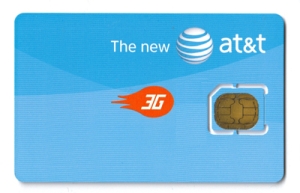
Last, This MicroSIM isn’t an industry stopper is it. Well no, most operators are going to offer a this MicroSIM as a bundle package with the iPad. I say why bother, request a twin SIM from your local operator, shave the new SIM with plastic or acrylic filer and your good to go. Haven’t tested it myself, I will surely let you know if it works as soon as my iPad lands.


Tags: None
sty
12
Play we współpracy z firmą Locon, udostępnił nowatorską usługę lokalizacyjną Bezpieczna Rodzina. Usługa dostępna jest w postaci aplikacji mobilnej instalowanej na telefonie Dziecka lub Bliskiego. Dzięki aplikacji to chroniona osoba może szybko skontaktować się z Rodzicem wysyłając odpowiednie powiadomienia lokalizacyjne na przykład w sytuacji zagrożenia. W dniu finału WOŚP (13.01.2013) specjalna oferta – aż 3 [...]
Tags: None
sty
12
Wczoraj przeczytałem, jak dobrze sprzedaje się muza u pomarańczowych, co jest naprawdę bardzo dobrym znakiem dla całego rynku. Już we wtorek pokażemy mediom i Wam czytelnikom bloga nasz pomysł na te usługi. Postaramy się przekonać Was, że nie warto ‘piracić” i można słuchać ulubionej muzy zawsze i wszędzie. Żeby nie było za nudno zaprosiliśmy na [...]
Tags: None
sty
12
Na 21 finał WOŚP przygotowaliśmy razem z Fundacją i firmą CocoLab.pl specjalną aplikację, dzięki której będziecie na bieżąco ze wszystkimi wydarzeniami związanymi z Orkiestrą. Koncerty, lokalizacje sztabów czy turnieje, wszystko to odnajdziecie na mobilnej mapie. To jeszcze nie wszystko! Znajdź wolontariuszy w Twojej okolicy i oznacz ich na specjalnej mapie, poprzez skanowanie unikalnych kodów QR znajdujących [...]
Tags: None
sty
12
Play we współpracy z firmą Locon, udostępnił nowatorską usługę lokalizacyjną Bezpieczna Rodzina. Usługa dostępna jest w postaci aplikacji mobilnej instalowanej na telefonie Dziecka lub Bliskiego. Dzięki aplikacji to chroniona osoba może szybko skontaktować się z Rodzicem wysyłając odpowiednie powiadomienia lokalizacyjne na przykład w sytuacji zagrożenia. W dniu finału WOŚP (13.01.2013) specjalna oferta – aż 3 [...]
Tags: None
sty
12
Wczoraj przeczytałem, jak dobrze sprzedaje się muza u pomarańczowych, co jest naprawdę bardzo dobrym znakiem dla całego rynku. Już we wtorek pokażemy mediom i Wam czytelnikom bloga nasz pomysł na te usługi. Postaramy się przekonać Was, że nie warto ‘piracić” i można słuchać ulubionej muzy zawsze i wszędzie. Żeby nie było za nudno zaprosiliśmy na [...]
Tags: None
sty
12
Na 21 finał WOŚP przygotowaliśmy razem z Fundacją i firmą CocoLab.pl specjalną aplikację, dzięki której będziecie na bieżąco ze wszystkimi wydarzeniami związanymi z Orkiestrą. Koncerty, lokalizacje sztabów czy turnieje, wszystko to odnajdziecie na mobilnej mapie. To jeszcze nie wszystko! Znajdź wolontariuszy w Twojej okolicy i oznacz ich na specjalnej mapie, poprzez skanowanie unikalnych kodów QR znajdujących [...]
Tags: None
sty
12

Back in September of last year, we announced a partnership with The Coffee Bean & Tea Leaf to bring wireless charging to its cafes for customers who want to recharge their phones on the go. Now, we’re seeing the first results of that collaboration.
It’s no secret that the CES expo in Las Vegas can be an extremely draining experience for both humans and smartphones alike, and so we’re happy to bring wireless charging to The Coffee Bean & Tea Leaf café at The Venetian Casino, Hotel & Resort—one of the first locations in the country to feature this.
The wireless charging is built into the tables at the café, so all you need to do is put your phone down on one of the marked areas on the table, and your phone will begin to charge. The technology is based on the Qi wireless charging standard, and the first time you give it a go, it feels quite magical.

You do need to have a smartphone with built-in wireless charging such as the Nokia Lumia 920 or to equip your phone with a wireless charging shell such as those available for the Nokia Lumia 822, 820, and 810.
The café offers fresh-roasted coffees, iced drinks, and specialty teas, so if you’re ever in Las Vegas, we encourage you to stop by the location and recharge yourself as well as your phone. The Coffee Bean & Tea Leaf at The Venetian Casino, Hotel & Resort is located on the Shoppes Level right when you enter from the valet service or the parking garage.
This is just the first step, as we plan to introduce integrated wireless charging plates into The Coffee Bean & Tea Leaf cafés in select major metropolitan cities across the United States.
Have you used wireless charging with your Nokia Lumia?

Tags: None
sty
12

Based in Portland, Oregon, Jason is our contributing editor who reports for us on mobile technology, ideas, apps and all the latest Nokia developments in the USA.
A fully paid-up gadget freak, this is what Jason’s Start screen looks like.

What apps have you prioritised and why?
I love how Windows Phone 8 lets me set my Start screen how I want it. I’ve used other mobile operating systems, and for me Windows Phone 8 is king.
I’ve arranged my top row of tiles to keep me in in the know across my most valued social tools, including my calls, my SMS and Facebook Messages, my email, and my most valued social network – Twitter.
My weapon of choice for Twitter is Rowi. I realize there are a lot of Twitter apps out there, but Rowi is the quickest, simplest and lets me know when I’ve missed an @ reply or direct message instantly with its use of push notifications.
Next you’ll find my calendar and my most used apps – Nokia City Lens, 4th and Mayor and two weather tiles from Amazing Weather that are pin-pointed on the two locations I visit the most.
What is the last app you paid for, and what does it do?

Amazing Weather HD. I’ve had Amazing Weather, but I recently paid for the upgrade to Amazing Weather HD because I really love the app’s speed and active visualization of weather with HD images based on a location’s current weather.
Despite there being a large number of weather apps in the Windows Phone Store, Amazing Weather stands out. Also, it uses Weather Underground data to base its forecasts on, which is my preferred weather website, so that’s cool also.
Which app(s) is your guilty pleasure?
Like my friend and colleague Jeppe, I’m absolutely addicted to Nokia Music. I love the curated playlists and I also enjoy creating my own custom lists based on my musical tastes at the moment.
No matter what mood you’re in, Nokia Music has millions of tracks and will supply massive variety in any musical genre you desire.
Aside from Nokia Music, the new revamped USA Today is fun to use – it brings lifestyle and sports info to my hand in a zippy app that is easy on the eye as well. I’ve tried other news apps, but USA Today takes the cake.

Tags: None
sty
12

Click here to view the video on YouTube.
The on-screen keyboard on your Lumia smartphone running Windows Phone 8 has been designed to be as accurate as possible, so you don’t make mistakes when you’re typing. It does this by adapting each key’s invisible ‘hit target’ as you type, creating a dynamically evolving keyboard.
For example, when you begin typing the letters H A P, the keyboard predicts you’re going to type the word HAPPY. The next letter’s invisible ‘hit target’ is expanded making the letter P’s hit target much larger, and the surrounding letters (O and L) shrink.
This is all so that when you’re tapping away at your keyboard, you can worry less about your spelling and concentrate more on getting your message across to the people that matter to you.
In a recent blog post over at the Windows Phone Blog, Jason Grieves, Program Manager at Microsoft explains: “On average people type 20 to 30 messages a day on their phones; that’s over 10,000 a year. They also make a lot of mistakes: about one in every three words, we’ve found.”
And as funny as mistyped text messages can be, users of Windows Phone should rarely find themselves featured on Damn You AutoCorrect, thanks to the keyboard feature we’ve mentioned here.
For more details on the Windows Phone 8 keyboard features, head over to the Windows Phone Blog.
What do you think about Windows Phone 8 keyboard?

Tags: None


