lut
6

This week’s Asha app spotlight concerns a service that plays to one of the great strengths of the Asha devices – being social and connected.
In the Nokia Store you will find all the apps and tools that you need for a terrific social experience. We’re talking giants of social media and messaging such as Facebook, Twitter, WhatsApp, ebuddy or Nimbuzz.
However, it’s Foursquare that gets the honour of being in the Asha app spotlight this week.
Look around you
The inscription of architect Sir Christopher Wren’s tomb at St Paul’s Cathedral reads:
“If you seek his monument – look around you.”
That’s what you get for designing one of the world’s most beautiful churches and, indeed, for his many other churches and historic buildings in London, many of which still stand nearly 300 years after his death.
For everyone else, there’s Foursquare!
Location, location, location

If you’re not familiar with the idea behind Foursquare, then the inscription on Wren’s tomb is a fairly good starting point.
It’s a social network with a difference, in that it is all about your location. When you’re out and about, you can use Foursquare to save and to share the places that you visit.
Likewise, you can also see where your friends have ‘checked in’ and read their reviews of restaurants or other places of interest.
You can get personalised recommendations and also special deals – all based on your location and the sort of places that you enjoy visiting.
Foursquare on Series 40
As you can imagine my mobile device, specifically my Nokia Asha 311, is the perfect way of using Foursquare.

As with any social network, the first thing you’ll need to do is to sign in or register if you don’t have a Foursquare account already. It’s a simple process that only takes a couple of minutes.
The opening screen has a big button for you to ‘Check In’ to your current location and shows you where else you have checked in previously.
Tap the check-in button and the app will load a list of the nearby places. Tap on a place to check in and you’ll also be able to leave a comment, take a photo and see who else has been here.
Think of it as declaring your arrival!
Badges
Foursquare has developed a nice sideline with its game of badges.
You get rewards for the places that you check in, particularly if you do it regularly, and will eventually receive an honorific title.
For instance there’s Adventurer, for checking into 10 different venues, Jetsetter for five different airport check-ins or Swarm for checking in at a location where 50 other people have checked in too.
This can be good fun and there are literally hundreds of badges for you to collect.
Exploration

As well as checking in yourself and collecting badges, Foursquare is really handy for discovering places of interest around you.
To do this, just tap the icon in the top right corner and you’ll see a drop down menu.
Places loads up your nearby locations and Explore brings up recommendations of places of interest in your area. Click on each one for more details, such as who else has been there, reviews and photos.
This app for Series 40 gives you all the Foursquare elements. It’s a social network where you can see where your friends have been, it’s a tool for discovery, it’s a fun game and it helps you to remember all the places you’ve been. Badges all round!
image credit: n.hewson

Tags: None
lut
6

To understand the thinking behind the Nokia Lumia 820’s design, you need look no further than Nokia’s own backyard. The Nordic design movement has dazzled the world with the concept of “beautiful things that make your life better” for more than half a century. But what are its key elements and where can you see its influence in the Nokia Lumia 820?
Modernist magic
Modernism is at the heart of Nordic design. More a state of mind than a specific style, Modernists believed that the design of an object should be based purely on its purpose – that ‘form follows function’. This philosophy very much complemented the Nordic way of thinking and resulted in Nordic design embracing the abstract motifs and bold primary colours, which are so much part of the Lumia 820’s look.

Democratic design
Another key feature of Nordic design is the way it aims to create accessible, affordable products that appeal to the masses. This tradition stems from established institutions such as the Swedish Society of Industrial Design, which was created to promote design that the general public could access and enjoy. This doesn’t mean stripping design of its beauty, quite the opposite. It means ensuring that beauty is first and foremost functional. A great example of this is the Lumia 820’s removable shells.

The lesson of less
When you live in place where the winter is long and very cold, the original basis for all design has to be function. In the Nordic countries, if a product’s design didn’t help you survive, it was no good. It’s this that explains Nordic design’s lack of decoration and its enthusiasm for minimalism. Use only what is needed, make its function clear and its form simple. You just need to hold the Lumia 820 in your hand to appreciate this aesthetic.

Industrial art
The Nordic countries industrialized a lot later than most of Western Europe. This meant that the mass production that kicked off between the two World Wars was on a much smaller scale there. As a result of this, the Nordic countries were better able to preserve their traditions of craftsmanship and integrate them into commercial production. The result has been called industrial art. Whether it’s the bevelling around the screen or the 4.3-inch OLED screen with ClearBlack display, the craftsmanship in the Lumia 820 is easy to see.

The Nokia Lumia 820 has been born from a design philosophy, which has influenced companies as diverse as Bang and Olufsen and Ikea. But what is it you enjoy most about Nordic design? The simplicity or the bold colours? The craftsmanship or the focus on function? As ever, we’d love to hear your thoughts in the comment section below.

Tags: None
lut
6

When it comes to our phones, they’re extremely personal devices. Jo Harlow has hers set up a certain way, Dean Pattrick his, and after seeing many others, it’s now my turn. Here’s my Windows Phone 8 Start screen.
I’ve only had my Nokia Lumia 620 for a week, so I’m still going through a process of alteration and on the look out for new apps or games. As for the colour of my theme, I’ve opted for lime as it matches the phone’s shell.
But for now, my Start screen has settled as so:

Which apps have you prioritised?
For me, as a typical Brit, I love to know about the weather. If it’s cold, sunny, or even slightly drizzling outside, I want to know about it without having to stick my head out of the window or putting on the TV for a weather update. Weather Flow sits at the top of my Start screen with one large Live tile that updates itself throughout the day.
Just beneath that, I have what I call my communication panel. In the centre, I’ve got a medium sized Me tile that gives me quick access to Facebook or Twitter updates, as well as notifications from these services. Flanking that are four small tiles; phone, messaging, personal email, and work emails.
The people sitting in my People Hub are important, too. They sit on the first half of my Start screen.
I’ve also set up a Room for us writers/editors of Conversations so we can all keep in contact with relative ease.

What apps do you use to pass the time?
At the moment, the number one app I use is Cinemagraph – I just love it. There’s loads of fun to be had just by messing about, capturing what can often to be fairly mundane situations. Freezing the frame and animating only one section can often be artistic, or even hilarious.
Second to that, I pop into the Games section fairly regularly. Not to play any game in particular, I’ve got a few in there that I dip into when I’ve got a spare moment.
What is the last app you paid for, and what does it do?
It was the Weather Flow app that I mentioned earlier and cost me £1.49. In regards to what it does, it essentially keeps me updated on the weather. However, it’s the way it delivers it to me that convinced me to part with my cash.
The Live tile is simple, yet descriptive. It uses simple language that leaves me with no doubt what the weather is like outside. It displays the temperature, along with a chance of rain percentage, which is very useful here in the UK.
I also love the way it takes over the Lock screen of my phone. The image changes depending on the weather and the same weather details are placed right on the Lock screen.
Which app(s) is your guilty pleasure?
It’s got to be Draw Something. I’m currently on 120-turn run that I desperately don’t want to ruin. There have been a few occasions where either my own, or my opponent’s drawing, have lead to me to believe that it’s game over. Thankfully, it’s still going, though. But for how long…?

Tags: None
lut
6

In the first part of our interview with Pekka Horo, he revealed some of the differentiators that are helping the Nokia Lumia range of smartphones stand out from the crowd.
There can be little doubt that Nokia Lumia owners are having fantastic experiences on their smartphones whether it’s in taking photos and recording videos, using the location applications, entertainment, charging their devices wirelessly and the vast array of quality apps that are available.
However, what other factors have helped to establish Lumia as one of the most exciting names in the smartphone market?
These are the questions we put to Pekka Horo, Nokia’s Vice President of Europe and IMEA Regions and Business Management for Smart Devices.
Pekka, how important is the role of the mobile operators?

Operator interest in Windows Phone as an ecosystem has been another momentum builder. We are in very close relationships with all the major operators in the world.
They see a lot of value in having an alternative to the Android and Apple ecosystems and have been very interested in working and partnering with us on a strategic level to develop and grow the Windows Phone ecosystem.
Has the release of Windows Phone 8 made a big difference?
I think it made a huge difference. Firstly, there are a lot of elements that were enabled from the software side when Windows Phone 8 came to the market. Some things that were not yet in place when Windows Phone 7 was launched, like language support in some markets, were finally realised on Windows Phone 8.
Secondly, the Windows Phone 8 introduction coincided with the Windows 8 promotional campaign and you could see the same user interface and common elements that are reflected in both platforms. All the marketing activities supported this holistic thinking and consumer experience from an operating system perspective.
Finally, I would also say that Nokia was able to bring highly competitive innovation to Windows Phone 8.
We called the Lumia 920 the most innovative smartphone in the world, which we truly believe and I think the market has accepted that as a statement of fact.

What role has the more affordable Lumias, such Lumia 620, played in helping you build your market share?
It is incredibly important that we support the ecosystem from a volume perspective. Getting more and devices into the hands of consumers means that we can attract more partners and more app developers.
Also, offering highly competitive smartphone experiences to consumers who may have a tighter budget is incredibly important.
What we say within Nokia is that we want to bring affordable smartphones but we don’t want to compromise on the quality or the experience.
If you look at the Lumia 620 for instance we are celebrating the design with the dual shot design innovation that is extremely vibrant and eye-catching. Even at this price point, we are offering fantastic experiences when it comes to imaging and we are also enabling Nokia differentiators like Nokia Music and location experiences.
Do you focus your attention on specific countries around the world?
There are different dynamics happening in different parts of the world. What has been very exciting is that we have been able to vastly expand our geographical coverage with the introduction of Windows Phone 8 – we doubled the language and geography support compared to Windows Phone 7.
North America is obviously a very important market to win in the flagship space and that’s why our relationship with AT&T has been so important to us.
North America is obviously a very important market to win in the flagship space and that’s why our relationship with AT&T, Verizon and T-Mobile has been so important to us. The halo effect or brand presence from North America will help to strengthen our brand in other markets as well.
From a volume and market share perspective we have a strong desire to expand our portfolio reach and offer great smartphone experiences in the more affordable price points across all markets.

Finally, Pekka, can you sum up for us the performance of Lumia in the marketplace so far and how optimistic you are for the future?
We have made a lot of great progress with our Lumia devices and we are off to a very strong start with Windows Phone 8. We sold 4.4m Lumia devices in the final quarter of 2012 and there was substantial growth in Lumia sales from Q3 so I think we’re on the right trajectory.
The feedback from consumers, operators, external bloggers and analysts on the Nokia differentiators and the competitiveness of our portfolio is highly encouraging.
We’re off to a good start here as we continue to delight people with our differentiating portfolio.
AT&T store sample of one.. “people are asking for Window’s phones as much as iPhones. We always sell them Nokia – that is the one to have”
— Bob Egan (@bobegan) February 4, 2013
i witnessed a lady return four iPhone 4S’s she bought a week ago from AT&T. She exchanged them for four #nokia 920′s. “kids bored” she said
— Bob Egan (@bobegan) February 4, 2013

Tags: None
lut
6

Brenda Laurel, the pioneering writer, researcher and designer, once said. “A design isn’t finished until somebody is using it.” We totally agree, which is why we need your help. A couple of weeks ago, we launched the Nokia Lumia 820 Design Challenge. Students from three of the world’s most prestigious design schools, Institute of Design and Fine Arts, Lahti University of Applied Sciences, Finland, Parsons, The New School for Design, New York, U.S.A. and Central Saint Martins College of Arts and Design, London, UK were given the chance to prove their expertise by designing a shell for the Nokia Lumia 820.
The fabulous fifteen
The response was incredible. Our judges have been busy looking through more than one hundred and thirty entries and finally, after much careful discussion, they’ve come up with this shortlist of fifteen. Here’s a taster of what to expect.


 Vote to win!
As you can see they’re all pretty spectacular, which is why we need you to help us pick the winner. To vote all you have to do is head on over to our Facebook page. There you can get a clearer view of the fifteen shortlisted designs and vote for your favourite. Voting closes on the 13th of February. What’s more, when you vote you’ll also get the chance to win one of three Nokia Lumia 820s featuring the winning designs.
London calling
As for the designers, well, the winner will get an amazing opportunity to kick start their career with a paid design internship with Nokia in London. The top three designers will also each win a Nokia Lumia 820 with their cover design on it, as well as a trip to Social Media Week in NYC. In addition, each of the fifteen shortlisted designers will win a Nokia Lumia 820. The top three designs will be showcased and fifty made available to be used by some lucky Lumia lovers!
We’re sure Brenda Laurel would approve.

Tags: None
lut
6

Time and time again, over hundreds of dinners and parties with friends, the topic “what if you got stuck on a desert island…” pops up. Who would you take, what would you take, what would you do, it’s an almost endless (if silly) conversation. So what apps for your Lumia would keep you entertained on said island? Here’s my list of apps that I just couldn’t manage without.
The first thing you’ll probably notice is that all but one of the apps are free. There’s a couple of reasons behind this. First, I don’t like paying for things if I can avoid it. Second, if I’m stranded on a desert island I’ve probably left my credit card at home (although you can also pay via your mobile phone bill), and third, there really are some great free apps out there.

Island life will no doubt be blissful, but lets fact it, unless you’re surrounded by people it will probably also get dull pretty quickly. So it’s all about entertainment. Legimi is one of the apps I use the most, and one I get the most enjoyment out of.
It’s easy to buy and download books to read on the Lumia, and it’s also easy to copy over your own collection of eBooks. Just don’t forget to upload your favourites to SkyDrive before you go, and then you can access them using Legimi whether you are.

When it comes to smartphones, I can’t help but fiddle with settings to try and get the best out of it depending what I’m doing. If I’m not using Wi-Fi, I like it to be turned off, and if I’m just making a voice call I’ll probably switch back to EDGE rather than 3G.
Toggle makes it easy to swap settings from the Start screen, without having to delve into the menu. All this results in a battery life of days on my Lumia 900, which will presumably be pretty important when stuck on an island!

Wherever I end up in the world, there’s a good chance that Nokia has been there and done that when it comes to mapping. I’m hoping my own personal desert island will have a car (or at the very least a bicycle!), and I’d like to explore it using Nokia Drive.
It’s amazing how accustomed we’ve become to using satellite navigation on phones like the Lumia 900, but now I have it, I couldn’t do without. Especially as it’ll also tell me where the nearest restaurants are!

When I’m not playing with phones, I find more and more of my life is being dedicated to golf. I’m rubbish, and the more I practice the worse I get, but I can’t stop trying. A desert island will obviously be the perfect place to hone my talent.
Connected Golfers makes it easy to keep track of your scores, and it’s also possible to find local golf courses and details for all the holes. And if I have to make my own golf course on the beach, I can enter all the details into Connected Golfers.

It would be silly to go to an unknown desert island without a torch, but the chances are I’ll forget. Thankfully there are plenty of free options for the Lumia, such as Flashlight-X. Tap a button and it turns the Lumia’s flash into a flashlight.
There’s even an SOS mode, so I can call for help once I get bored of the glorious weather and deep blue see.

Fingers crossed that if I’m stuck on a desert island, it’ll be somewhere tropical and warm – rather than somewhere off the north coast of Scotland – but none-the-less I still want to know what the weather will be like.
I love AccuWeather – the Start page tile looks great, the app is easy to use, and it does exactly what it says on the tin.

As with most people, I can’t imagine life without music, so my Lumia 900, a pair of headphones and Nokia Music will help to complete my stay at the tropical island of mystery. I’ve already got hours of my own music stored on there, with access to more via SkyDrive.
And if I’m in it for the long haul, I can also access new and interesting music thanks to Nokia Music’s Mix Radio function.

Angry Birds has made a splash like no other game over the past few years, and it’s absurdly addictive. I’m not even much of a gamer, but once I’ve started with Angry Birds I can’t leave it alone. So I’ll be taking that along with me as well. Even though I have better things to do with my time!

Tags: None
lut
6

This time last week, I was lucky enough to take delivery of the new Nokia Lumia 620 – Nokia’s latest, and most affordable, Windows Phone 8 smartphone. Since then, I’ve been using it on a daily basis and putting it through some real-world tests.
Like a kid on Christmas morning, I grabbed the delivery bag, tore it open and glanced at the contents – a blue box with the words “Nokia Lumia 620” printed on it.
Hardware and design
In addition to this, I found three shells (back covers) hiding in the bottom of the bag; one glossy lime (dual-shot made of yellow and cyan), one glossy orange (dual-shot made of yellow and magenta), one matte cyan, and one matte frosty white. Worth noting that you only get one of these shells inbox, the others have to be bought separately. I got all of them as a special delivery from Helsinki!

Dual-shot is the term we’re using to describe the blending of our CMYK palette to create new and exciting colours. For example, for the glossy lime we used a yellow polycarbonate base colour and overlaid it with a transparent cyan one. From the front, you’ll see a double layer of colours, but from any other angle, all you can see is a vibrant, luscious lime colour.
Comparing the weight with my Nokia Lumia 800, the Lumia 620 feels lighter, but not in a cheap way. It feels solid and heavy enough to fit snugly into the palm of my hand while the smooth back and rounded edges give the whole phone a comfortable feel.
The 3.8″ TFT WVGA ClearBlack display produces some vivid colours, equally on par with the Nokia Lumia 920 and the Lumia 820. Plus, the screen can be used with gloves on – very handy for this time of year or for those living in colder countries. Correction: this feature is not actually supported on the Lumia 620, though I was able to achieve it.
From the start, it’s clear to see that the Nokia Lumia 620 is a fun, almost-youthful smartphone, thanks to the new colour range.
After popping in my Micro SIM card, a spare 8GB Micro SD card (supports up to 64GB) and the 1300mAh battery, I clipped on the lime shell – it just happened to match the jumper I was wearing that day – and powered it on.

Software
As is usual with any new phone, there’s a brief process of selecting times and dates, as well as the option to sign in to your Microsoft account, something you’ll need if you want to purchase any of the over 125,000 apps or games available on the Windows Phone Store.
Then it’s probably a good idea to head into the settings and then ‘email+accounts’ to setup any email accounts you may have, and to sign into Facebook, Twitter, LinkedIn, or Sina Weibo. Or none, if you’re not using them, of course.
With the boring necessaries out of the way, the first thing you’ll want to do is personalise the Start screen, even if it’s just to change the colour theme and the accent colour. It seemed only natural to change the default theme from cyan to lime, considering I opted for the lime green shell.
Once I’d made some more adjustments to my Start screen – resizing Live Tiles, adding email tiles, and moving tiles around – it was time to delve into the Windows Phone Store to download some great games and apps.
I made sure I covered the basic, and essential, as far as I’m concerned, apps/games; Cinemagraph, Creative Studio, 4th & Mayor, Weather Flow, Draw Something and Angry Birds.
Right now, I’m loving the Cinemagraph app. Here’s my first attempt, down a dark alley:

Cinemagraphs have got me thinking about photos in a completely different way. Rather than seeing a single, static scene, I now look at something and see the animation potential.
OK, so Cinemagraphs don’t take full advantage of the 5MP camera, because the saved format is a GIF, but it produces some interesting results.
However, the 5-megapixel camera does take a great photo, as you can see below. The tube lighting in the office wasn’t ideal, so I auto fixed it using the built-in tools with just a click.

Performance
You’d be mistaken in thinking that because a device has 512MB of RAM, it would run slowly and you’d experience a certain amount of lag. However, this isn’t the case.
The dual-core 1GHz Snapdragon CPU does a fantastic job at keeping everything running as smooth as any other – more expensive – smartphone.
In terms of battery performance, I easily get a full day out of it, with a fair amount of usage. As I’m still in the honeymoon phase, where I’m still trying to find new things with it, I’d expect the battery to run down considerably quicker. But it doesn’t.

The official stats for talk time, using GSM or WCDMA, are up to 14.6 hours and 9.9 hours respectively. As for standby time, it’s up to 330 hours.
If you’re into your music, you’ll be happy to know that the Nokia Lumia 620 plays it loud; at about 100db we believe. Perfect for listening to you favourite bands using Nokia Music.
As a big fan of NFC, I’m delighted to be able to finally have that technology in my pocket, in an affordable, attractive, fully functional package as the Lumia 620.
What do you think of the Nokia Lumia 620? Join in the discussion below, to let us know.
Note: This article was first headlined as a ‘review’, obviously, it’s more of a hands-on account of Adam’s experiences and the headline has been changed to reflect that.

Tags: None
lut
6

The electric guitar, the digital camera, 3D printing, the list of technologies that have generated new ways to unleash our creativity goes on and on. Tech has always given artists, musicians and film makers new ways to express themselves. Today, though, technology and art are more intertwined than ever. It’s no surprise then that Nokia has been helping to promote a cool new artistic endeavour in New York called IDLE. To find out more, we hooked up with organizers Katya Guseva and Luke McCann.
Thanks for joining us guys. So what exactly is IDLE and what makes it so special?
The mission of IDLE is to blend and merge the two worlds of audio and visuals together. We love going to music shows, we love art exhibitions, but both worlds are so tightly intertwined, that it makes perfect sense to experience them together at the same place, same time. Lots of musicians these days are turning to visuals, created specifically for their music, and visual artists have always been inspired by music. We want to bring our favorite musicians and artists together.

What makes it special though (besides our excellent curation of course), is the personal approach and intimate settings, where only a couple hundred people can enjoy acts that usually gather big night clubs.
New York is one of the world’s most international cities, how is this reflected in its art, music and film?
You’d think so, but even though the creative scenes are blooming, there are only so many outlets and venues, that don’t require bottle service or close at 2 am. It’s hard to see a show where there’s equal attention given to the environment and the content. If the venue is all decked out, it’s probably going to lack quality of sound, or talent. If the sound and dj are great, it’s usually in a dark basement. To each their own, but with IDLE we hope to create an experience that’s going to stimulate both audio and visual senses.
What sparked the idea to mix a club night with film and art? What theme unites them?
When you put two minds together, beautiful things might happen. Big Up Magazine and Reconstrvct always shared similar aesthetic, however the ways we share them were different. Reconstrvct being an underground dubstep night wanted to branch out into different outlets and styles of music. Big Up, having an online and print presence wanted to do something more involved in the local scene. It all blended perfectly into IDLE.
Dance music’s been around since the late 80s. Why do you think it’s stayed so popular?
Dancing is the most natural thing people do. Anyone can dance, move to the rhythm. Rhythm is present in everything beginning with our heart beat, breathing, walking… If you’re talking about electronic dance music, it’s become popular with the rise of computers, and it’s not going away, now that any 15 year-old can start producing music on their smart phone. Dance is the release of all sorts of energies, be it negative emotions or joy. And people love going out to release everything they’ve been holding inside for a while. We can only hope that we manage to create an environment where people can feel free and comfortable to have a good time and dance.

How has mobile tech changed the way people create music, art and film in your experience?
It’s fascinating how many young and talented people are around us these days. Still in high school, they have releases on major labels, create covers for magazines and make their own music videos. We can easily attribute this to the Internet and the spread of devices like laptops, tablets, phones and their variations. What it’s done is made creating content easier, learning more accessible, and spreading lightning-fast. It brought about flood of art, music and film expressions, both good and bad. And there’s no stopping from now on. Expect your toddler being the next Warhol.
What is it about Nokia that made you want to work with them?
We’ve seen Nokia getting behind very cool initiatives lately, which create authentic experiences with music, art and film. And it was only logical for us to reach out with our unique idea. We’re over the moon, humbled that Nokia loved what IDLE is about, and we hope for a long and fruitful partnership.
We think this is a super cool new collaboration, and hope you do, too. In the next couple of weeks, we’ll get up close and personal with some of the artists, musicians and film-makers who used Lumia 920′s to record their IDLE nights.
In the meantime, we’d love to hear your thoughts on whether tech is powering art for better or for worse.

Tags: None
lut
6

The sense of freedom, the sense of mobility, the outstanding feeling of knowing you left nothing behind. The Nokia Booklet 3G, where do I start? , but first let me make a statement. The Nokia Booklet 3G is a ‘Netbook’ and not a laptop so treat it as such.
Design, Size, Weight, Screen are flawless. I couldn’t say anything else, because I was surely impressed on how much Nokia put thought into this device. Speed for me is just fine; some have complained about its RAM and processor, frankly I would tell them they have no idea about computer mechanics. There is something they haven’t noticed and people like me would pay top dollars for. That is the NO FAN option, finally can sit in bed and not disturb anyone with the whizzing sound of the cooling fan. Plus what more can you ask from a netbook, use it as it was design and supposed to be used so just plug in a 2GB Flash drive and use it as a ReadyBoost or have you totally forgot about that?. Coming back to the essential elements of this device, using the 3G gave me the ability to sit where and when ever I want. No Dongles, Bluetooth, or Cable connections required. Power on and connect, simply amazing feeling you’ve got knowing you can get what you want in no time. The Nokia Booklet 3G is such a good device that I know use it as my own corporate computer device. Called in IT and asked them to remove my bulky laptop back it up on the local network so I could access it on my booklet. My desk is so clean right now it’s not even funny. I put this device to the ultimate test on the first day of work, dropped my notebook pens and every manual item you can possibly take to a meeting. Fired up OneNote, held a 3 hour meeting took all the notes I needed on my Booklet, attached pictures from my N900 and I was the first one out of the door. Didn’t have to gather all my papers, put together my laptop disconnect my charger, and wind up all sorts of wires. The best part I even leave quicker, All I’ve got is my Booklet and I’m out, charger is at home.
Last but not least, and I know most of you want to hear some partially negative things about this device and I don’t blame you. Nothing is perfect, and yes for some the Nokia Booklet is not the perfect device. But I can highlight some things that can be on the list of improvements for the RX-80 probably. First I would love a touch screen integration, which would make things a lot faster for me. The keyboard keys to be backlit, would make a big difference in low light environments. The ‘Ctrl’ key to be on the very left instead of the ‘fn’ key. More Nokia related software built-in, to control the connectivity. Would love a remote viewer built-in so I could make calls with my device but talk and hear it through my booklet or my BH-504 connected to my booklet. Why bother all your customers with the SIM lock by AT&T, It’s very easy to crack save us the hassle and include a Nokia UI for the SIM connectivity.
Final review thought, if you’re looking for being connected ‘Full Internet As It Happens’ the Nokia Booklet 3G is the device for you. If you’re a laptop speed oriented and has 16 million applications and programs the Nokia Booklet 3G won’t do for you. If you’re a on the move business person, looking for agility and essential connectivity, the Nokia Booklet 3G serves every single part of that.

Nokia Booklet 3G


Tags: None
lut
6
Yes i know to most of you out there this information about the iPad using a MicroSIM is not new to you, but for most of you in the Middle-East hungry for an iPad in your hands; HOLD YOUR HORSES!!! Let me first say that 100% of all GSM operators in the world use the default SIM size. Now good old Steve has given a nudge to the telecom operators around the world.
Apple’s big reveal of 2010 was the glorious iPad, some have given their critical analysis of the device. I say the device will pick up like any Apple device in the market. Now the jolt that the mobile industry got was that the iPad uses a MicroSIM enable it to use 3G. Apple’s tie or (love/hate) relationship with AT&T gave it a heads up on orders of MicroSIMS to deliver its service to its customers in the US.
So what is the (MicroSIM) : The 3FF SIM card, or the micro SIM, is 52% smaller than a regular SIM card so instead of a 15 x 25mm card you get a 12 x 15mm one. It’s still a GSM SIM so it will work in most markets. Now I believe Apple’s attempt to lock the SIM during the iPhone launch days blew up in their face.
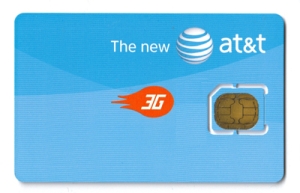
Last, This MicroSIM isn’t an industry stopper is it. Well no, most operators are going to offer a this MicroSIM as a bundle package with the iPad. I say why bother, request a twin SIM from your local operator, shave the new SIM with plastic or acrylic filer and your good to go. Haven’t tested it myself, I will surely let you know if it works as soon as my iPad lands.


Tags: None


