kwi
26

With a microSD card at the heart of your Nokia Asha, the sky’s the limit when it comes to enjoying, storing and sharing your apps and media content. Nokia has included a comprehensive file manager with the Asha as well, so it’s also easy to keep track of everything on your phone. I’ve been trying out the file manager on my Nokia Asha 308.
To access the file manager, click on the ‘Files’ icon on the menu screen of your Nokia Asha. Navigating files and accessing content on your microSD card couldn’t be easier; it’s the folder at the top of the list titled ‘Memory Card’.
Click on that, and you’ll see a number of sub-folders on the card, including folders for Nokia Maps (Cities), an Apps folder, Videos, Playlists and Recordings.

Checking memory
If you want to know how much storage space you’ve used, simply tap the menu button at the top-left of the screen, and then click on ‘Memory Status’. This will let you know what you’ve used on both the phone’s integrated memory and your microSD card.

Mark all
If you have photographs, music or other files that you want to delete in bulk, simply head into the folder they’re located in, tap the menu button again, and click ‘Mark All’.
This gives you the option to carry out a number of different tasks. Click the menu button again and you’ll be met with the following options:
Delete Marked, Send Marked, Move Marked, Copy Marked. As these options show, it’s not just about deleting your files, and the file manager offers a great way of sharing content with your friends by email, message or Bluetooth.
Add a folder
It’s just as easy to add a folder to your microSD card for future files – simply head back to the memory card itself, click the menu button and tap ‘Add Folder’. Once you’ve done this, you’ll be able to move files from other folders, making it easy to keep on top of things if you want to separate photographs or music, for instance.

Using your PC
That’s just the tip of the iceberg, however, and it’s also possible to do a lot more using a USB cable and your computer. Once you plug your Asha 308 into your PC, you’ll be met with three different options: Nokia Suite, Media Transfer and Mass Storage.

Mass Storage is the simplest of the three, and literally lets you use your Nokia Asha as a giant memory stick. It’s easy to use, but it’s also a bit limited. Most of the folders you have on your Nokia’s microSD card won’t show up, so you won’t be able to make major changes.
Media Transfer offers enough functionality to keep most people happy. If you select it, your Nokia’s SD card will show up on your computer as an external drive – just as it does when you select Mass Storage. This time you’ll be able to access more folders, however, including your photos, music and video folders.
It makes transferring media files a clinch; simply drag and drop the files you want either on your computer or your Nokia Asha.
Nokia Suite is the final option, providing a far more comprehensive way of interacting with your Asha. It’s possible to access all your files using Nokia Suite, and you can even search for apps, download and install them using your computer. It’s ideal if you have a limited data plan and want to get more apps.

Tags: None
kwi
26
Over the last couple of weeks we’ve been reaching out to people and asking them to experience the camera on the Nokia Lumia 920. Here we will showcase some of the images taken, along with thoughts from the photographers themselves.
 Here are a couple of shots taken by Jason Friend (www.jasonfriend.co.uk), an award winning landscape and travel photographer based in the UK. The one above is the very first he took and below is a ‘nice and vibrant’ effort in low light.
 So far Jason admits he loves the true 16:9 sensor on the Lumia 920. He’s also noticed something that is missing… #2instawithlove. After catching up with him he had this to add:
“It is great to be able to control the settings of the camera especially iso and Ev (exposure). The lens is also nice and sharp… And after all the lens is really one of the most important aspects of any camera.”
 Next up we look at the vivid photography of Peter Goodbody (www.p3dro.co.uk).
Just by looking at his set of images you can see that they are truly stunning. The above graffiti and this stair case at the Odeon in Liverpool are particularly striking to me. It’s worth noting that Peter edits every photo he takes in Lightroom, even those from the Lumia 920.
 Peter’s review is rather practical and based on whether the phone could produce images he’s happy with, while also fitting into his workflow. There are lots of positives including slow shutter speeds that help to capture sharp images thanks to OIS. He also reckons images ‘are sharp and impressively free of noise, even at high ISO’.
Take a look at the full review for the whole picture, if you’ll excuse the pun.
 The cute doggie above belongs to Michael Palmer (www.michaelpalmer.com), as does the image. Unfortunately his testing turned out to be a disaster due to a fault with the unit. However, he did manage to produce one of his favourite pictures of the cute doggie above (Skip), and some great shots around London to boot.
Another Lumia 920 will be in Michael’s hands soon enough, so we’ll hopefully hear a happier tale next time… and see some more photos of Skip! In the meantime enjoy this video Michael shot with the Lumia 920 on a Photowalk in London.
 Finally we have a camera review from Bouvanrooij (www.thegadgetbook.com). Overall he found the camera on the Lumia 920 to be ‘outstanding’. He’s been using it for one week and is positively ‘loving it’. Below you’ll find his video review or you can jump through to the written review on thegadgetbook.
If you like the images you’ve seen here or want to know more about the photographers behind them I urge you to check out more of their work. If you have your own Nokia photography that you would like showcased please send it in, or tweet us @Nokia_Connects!

Tags: None
kwi
26

On Monday we teased that we’d be launching something new, and just yesterday we announced the new Nokia Asha 210, a fresh-looking QWERTY phone with the world’s first dedicated WhatsApp button. We’ve been following some of the blog/news sites from across the Web to gather up their reactions. Let’s share them with you now:
The Verge
The headline from The Verge simply reads:
Nokia’s WhatsApp QWERTY phone to take on BlackBerry
Matt Brian makes a good point in his article, and something that’s worth remembering. WhatsApp is a multi-platform service that connects WhatsApp users to other WhatsApp users, no matter what device they’re on.

Engadget
Nokia gave James Trew from Engadget hands-on access to the Nokia Asha 210 and he wasted no time in giving it a test.
In James’ article he talks about the design language resembling that of the Nokia Lumia range by using the same colours. He also writes about Nokia’s efforts to create the polycarbonate-like one-piece design we have on Lumia, although it’s worth noting it’s not a one-piece device in this case.
The design is great for this price, the social features will please many, and there’s just about everything you might need for photos and sharing.
TechCrunch
Natasha Lomas writes an in-depth look at the Nokia Asha 210 and examines the design, the rest of the hardware and also the software. With a dedicated WhatsApp button, Natasha looks at the active user figures to help understand why this might be a good decisions for Nokia.
Last week the messaging service [WhatsApp] said it now has north of 200 million monthly active users (this compares to BBM’s more modest 60 million). Tapping into the hugely popular social messaging craze is clearly Nokia’s aim here

BBC
The BBC have gone into some detail in their write-up of the Nokia Asha 210 announcement, not only looking at the phone’s features, but also at a study detailing WhatsApp and texting usage among its fans.
In true BBC form, there’s a note of impartiality as it lays out the facts.
Analysts suggested the move would make WhatsApp the text app of choice on the handsets, but suggested it would have limited impact on the wider mobile phone market
CNET
In a fairly short post by Rich Trenholm, he keeps to the point, sharing little but the facts. However, he connects the phone to recent trends:
Like the recently-announced Facebook Home, the 210 plugs a social network into the heart of the phone. The popular WhatsApp instant messaging service integrates with the 210′s phone book so you can start chatting straight from your address book, and chat notifications pop up even when you’re not in the app,

Pocket-lint
In Hunter Skipworth’s article on Pocket-lint, he looks at the spec of the Nokia Asha 210, as well as the price and looks.
The phone is going to go on sale in the US at just $72 for both the single and dual-sim variants. It certainly looks a lot better than Nokia’s previous Asha efforts and gets one up on most other affordable Android phones in terms of design.
What do you make of the new Nokia Asha 210? Tell us, below.

Tags: None
kwi
26
Category: NOKIA EUROPA | Leave a Comment
Tags: None
kwi
26

Yesterday we launched the Nokia Asha 210, an affordable QWERTY phone with a dedicated WhatsApp button for those wanting quick and easy access to their WhatsApp friends.
This got us thinking here at Conversations. If you could pick another app to have a dedicated button, which would it be? Let us know, in this informal poll.
If you can think of another one, include it in the Other: option and we’ll add it to the poll.
We’ve excluded Facebook from the list because that’s already available on the Nokia Asha 205, and also a different variation of the Nokia Asha 210.
Take Our Poll
We’ll count up the results in about a week’s time.

Tags: None
kwi
25
Lubicie to bardzo 
Od północy do północy kolejna promocja doładowań – przyda się na majowe ekscesy
Szczegóły?
5-10 zł = 75 MB
11-25 zł = 75 SMS
26 – 50 zł = 75 min do wszystkich sieci
51 zł = 75% na wartości doładowania!
Promocja dostępna na doladowania.play.pl oraz w aplikacji na profilu Facebook.com/Play !

Szczegóły jak zwykle w regulaminie.

Tags: None
kwi
25
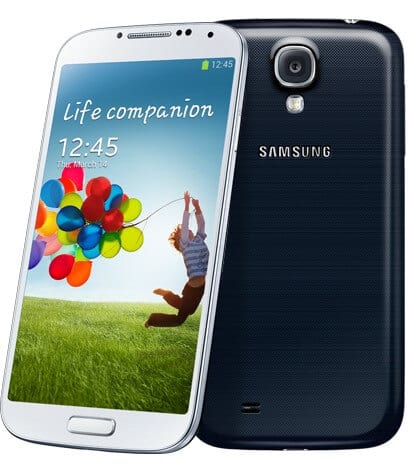
Jeszcze niedawno byliśmy na premierze tego super smartfona a już od jutra będziecie mogli go zamówić w ramach przedsprzedaży w sklepie internetowym 
Weźcie go koniecznie do ręki. Jest cieńszy, lżejszy, ma większy ekran i może więcej i szybciej niż SIII. Ok plastikowa obudowa moze nie jest jego najmocniejszą stroną, ale ten sam „problem” miał SIII i jakoś nie przeszkadzało to w fenomenalnej karierze tego smartfona. Nie jest to rewolucja, ale bardzo przyjemna i użyteczna ewolucja. Wiem bo jestem zadowolonym testerem. A cena… no cóż…taka sytuacja
Kto nie widział relacji z premiery może zrobić to w tej chwili (oczywiście po przestudiowaniu cennika;)
Click here to view the embedded video.
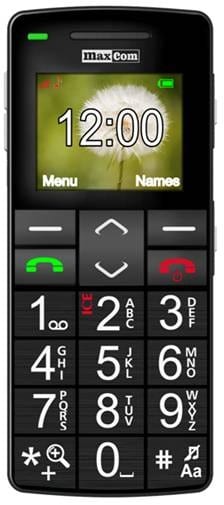
Dodatkowo do oferty Play Domowy wprowadzamy telefon MaxCom MM705BB.
Wszystkie ceny znajdują się w plikach poniżej:
Zmiana cen 24_04_13 komunikat
Zmiana cen 24_04_13x

Tags: None
kwi
25
Jeszcze niedawno byliśmy na premierze tego super smartfona a już od jutra będziecie mogli go zamówić w ramach przedsprzedaży w sklepie internetowym
Weźcie go koniecznie do ręki. Jest cieńszy, lżejszy, ma większy ekran i może więcej i szybciej niż SIII. Ok plastikowa obudowa moze nie jest jego najmocniejszą stroną, ale ten sam „problem” miał SIII i jakoś nie przeszkadzało to w fenomenalnej karierze tego smartfona. Nie jest to rewolucja, ale bardzo przyjemna i użyteczna ewolucja. Wiem bo jestem zadowolonym testerem. A cena… no cóż…taka sytuacja
Kto nie widział relacji z premiery może zrobić to w tej chwili (oczywiście po przestudiowaniu cennika;)
Click here to view the embedded video.
Dodatkowo do oferty Play Domowy wprowadzamy telefon MaxCom MM705BB.
Wszystkie ceny znajdują się w plikach poniżej:
Zmiana cen 24_04_13 komunikat
Zmiana cen 24_04_13x
Tags: None
kwi
25
Lubicie to bardzo
Od północy do północy kolejna promocja doładowań – przyda się na majowe ekscesy
Szczegóły?
5-10 zł = 75 MB
11-25 zł = 75 SMS
26 – 50 zł = 75 min do wszystkich sieci
51 zł = 75% na wartości doładowania!
Promocja dostępna na doladowania.play.pl oraz w aplikacji na profilu Facebook.com/Play !
Szczegóły jak zwykle w regulaminie.
Tags: None
kwi
25
The next Sony software rollout for Xperia P, Xperia go and Xperia Edual is starting this week – it is a phased process and will ramp up over this month and next*.
The new software brings Android 4.1 “Jelly Bean”, along with a number of different and improved Sony features. We’ve been working to blend our Sony Xperia software with Google’s Jelly Bean release to create some cool user experiences – some of the functionality you can look forward to includes:
Newer and even more intuitive versions of Sony Media apps: WALKMAN, Album and Movies
A set of slick, easy-on-the-eye libraries that let you access and share all your snaps, videos and tunes.
Make your battery last longer with Battery STAMINA Mode
Battery STAMINA Mode lets you get the most out of your battery when you need it. Fully customizable, your phone knows when the screen is off and shuts down the draining apps you don’t need, and then instantly starts them up again when the screen is back on.
Organize and search for your apps in a new quicker way
Application tray sorting is that bit breezier – just press and hold on any app – move, add it to your desktop or create a folder within the tray by dropping it on top of another.
We’ve also added a new search function within the application tray that makes it easy to locate your favourite apps.
Personalize your phone even more with your additional panes
A revamped homescreen experience for handling widgets, apps and shortcuts… with up to 7 desktop panes, widgets that auto-resize and actionable notifications, you have complete flexibility to create the interface you want with a few simple touches.
Google Now brings you just the right information at just the right time even before you know you need it
Combining the power of Google search and user profiling, Google Now helps you accomplish daily tasks more efficiently. You can learn more about Google Now here.
In some cases – particularly for Xperia go users – we’ve only made the upgrade accessible via PC Companion or Bridge for Mac due to the size of some software packages, and these users will only receive an in-phone notification if running Ice Cream Sandwich.
We’ve heard your questions and know you guys are keen to hear about updates for Xperia S, Xperia SL, Xperia ion and Xperia acro S – these smartphones are next in line to start receiving Sony’s Android 4.1 software from the end of May.
We’ll bring you the latest info when we can and, as always, you’ll only find the official details right here on the blog.
*Availability and rollout timing will vary by market and customer variants
Tags: None